Disaster Recovery From a Mobile Hotspot
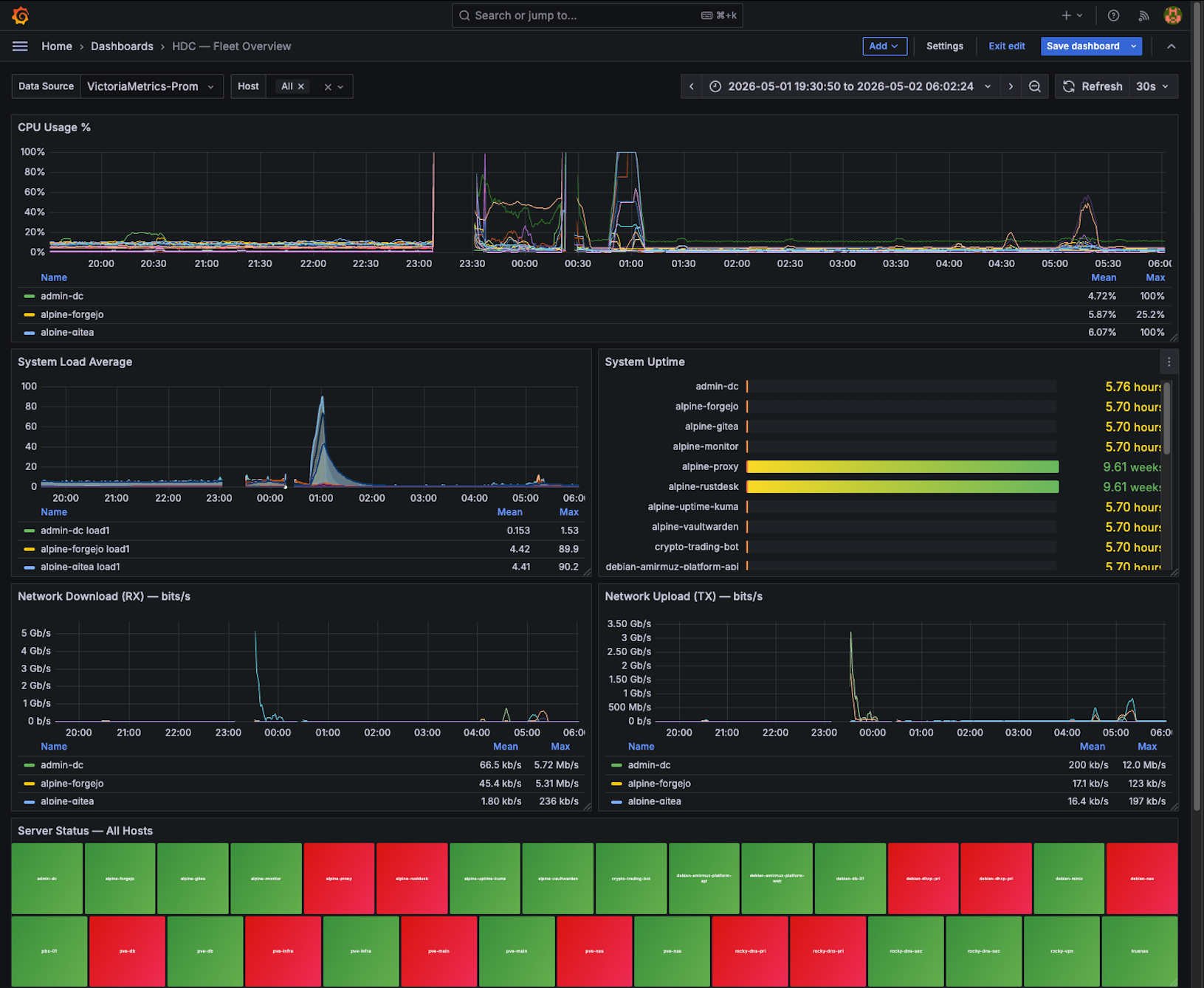
The power went out. When it came back, the Ceph quorum was broken, a monitor was crashing on every start, and SSH had reverted to port 22. Here's how I recovered the entire homelab 100% remotely — without touching a single cable.
Disaster Recovery From a Mobile Hotspot
Date: 2026-05-02 Series: Homelab Infrastructure Difficulty: Intermediate Time to read: 12 min
"What's the hardest problem you've ever solved?"
If someone asked me that in an interview tomorrow, I'd tell them this story.
Not because it was the most complex system I've ever touched. But because it tested everything at once — judgment, patience, methodology, and the ability to think clearly when nothing is working and you have no physical access.
The power went out overnight. When I woke up, nothing responded. Not the VPN. Not remote desktop. Not SSH. The homelab — which hosts my DNS, DHCP, Ceph storage cluster, and web services — was completely dark from the outside.
I was on a mobile hotspot. No ethernet. No access to the rack. Just a phone, a laptop, and whatever I had built ahead of time.
This is the story of how I got it all back.
What I Had Built Before This Happened
Before I get into the recovery, I need to talk about the one decision that made everything else possible.
Months earlier, when I was building out the homelab, I added something that seemed almost paranoid at the time: an old Cisco Catalyst 2960 sitting in the rack, completely offline — no router connection, no internet, no management VLAN. Just powered on, with console cables running from every device in the rack into its ports.
Laptop (brought to rack for emergencies)
        |
  USB-to-serial cable
        |
  Cisco Catalyst 2960  ← OOB switch (no internet — management only)
        |    |    |    |
       ER-X FPR  C3850 iDRAC
      (WAN) (FW) (SW)  (servers)
Out-of-band management. It has no dependency on the production network. Even if every other device in the rack was misconfigured, crashed, or unreachable — the 2960 would still let me open a console session to anything.
That paranoid decision is why this story has a happy ending.
The First Hour — Reading From the Edge
The first rule when diagnosing a full outage: start at the edge and work inward. Don't guess. Don't jump to the application layer. Start with the WAN, and only move deeper when each layer is confirmed healthy.
I grabbed a laptop, connected it directly to the 2960, and started opening console sessions.
EdgeRouter X (WAN edge) — healthy. No crashes. Routing table intact. PPPoE was deliberately left disabled — I had turned it off before the outage so the ISP's default router could keep WiFi alive for remote access. That decision paid off.
FPR1120 and PA-220 (firewalls) — both had rebooted on power restore, but recovered cleanly. ARP tables populated, VLANs tagged correctly through the Catalyst 3850. The firewall layer was alive.
The edge was fine. The problem was deeper.
Layer 3 — Getting Remote Eyes
With the edge confirmed healthy, I needed to stop relying on a physically-connected laptop and get a proper remote session.
The VPN wasn't coming up — and I quickly realized why. The DDNS record hadn't updated after the power restore. My WAN IP had changed, and the hostname was still pointing at the old one.
Simple fix: I looked up the raw public IP and used that directly for the VPN connection instead of the DDNS hostname.
Connected. I now had a full remote session from my mobile hotspot. No more needing a laptop physically in the room.
That's the moment you breathe again.
Layer 4 — Proxmox via iDRAC
The main server is a Dell R630. It has an iDRAC — Dell's out-of-band management interface. Even if the host OS is completely down, iDRAC stays alive on its own dedicated port. You can access the server's virtual console, see what's on screen, and control it — without touching the OS.
I connected to iDRAC, launched the Virtual Console, and got eyes on pve-main's screen.
Good news: the OS was up. Proxmox was running.
The Proxmox web GUI told a different story.
Layer 5 — The Root Cause: Kea DHCP Was Down
In the Proxmox web GUI, several LXC containers were stopped or in error states:
- Kea DHCP — down
- BIND9 DNS — down
- Several other infrastructure services in various states
I started with Kea — and I'm glad I did. Because Kea was the root cause of the most visible symptom: no wireless devices had internet access after the blackout.
Here's why. Without DHCP, no device on the network can get an IP lease. Wireless clients — phones, laptops, everything on WiFi — depend on DHCP to join the network. When the APs came back up after the power cut, they couldn't serve clients because the DHCP server (Kea, running in a Proxmox container) hadn't started cleanly.
Every wireless device in the house had no internet. Not because of the firewall, not because of the WAN — because the one container responsible for handing out IP addresses had crashed on restart.
We diagnosed the Kea configuration, found what had broken during the abrupt shutdown, fixed it, and brought it back up. Within minutes, wireless devices started reconnecting through the APs.
That single fix restored internet for everyone. The rest of what follows is the deeper infrastructure layer — Ceph, OSDs, SSH — things that matter for the homelab's internal health but that most users wouldn't notice.
Layer 6 — Ceph Quorum Broken
With core network services restored, the next Proxmox alert: 1 of 3 Ceph monitors was down.
Ceph uses a consensus algorithm across monitor nodes. With only 2 of 3 alive, the cluster was degraded — not dead, but running on thin ice. The crashed monitor was pve-main, and it was crashing on every startup attempt with:
FAILED assert(paxos->is_consistent())
The Paxos transaction log — the mechanism monitors use to stay in sync — had corrupted during the abrupt power cut. Every time the monitor tried to start, it hit this assertion and died.
Step 1 — The stale IP problem. The ceph.conf still had an old IP entry for pve-main. Removed it from the mon_host line.
Step 2 — Destroyed the broken monitor via Proxmox GUI. Recreated it fresh.
Step 3 — The new monitor still crashed. This confused me at first. The new monitor was clean — so why was it failing?
Because the corruption wasn't in the new monitor. It was in the Paxos log on the healthy monitors. When the new monitor tried to sync, it was receiving corrupted data from pve-db and pve-nas.
Fix: compact and trim the logs on the healthy monitors:
ceph config set mon mon_log_max 100
ceph config set mon mon_log_max_summary 50
ceph tell mon.pve-db compact
ceph tell mon.pve-nas compact
Compact. Restart. The new monitor synced cleanly. HEALTH_OK.
Three monitors. Full quorum. Ceph cluster healthy.
Layer 7 — OSD Slow-Ops on the Wrong Node
After the monitor recovered, one more Ceph warning: OSD.3 was showing slow operations.
I tried restarting it on pve-main:
systemctl restart ceph-osd@3Unit not found.
Right. Before touching any OSD, check which node actually owns it:
ceph osd treeOSD.3 lives on pve-nas — not pve-main. I had assumed wrong. Restarted on the correct node:
# On pve-nas
systemctl restart ceph-osd@3
Slow-ops cleared immediately.
Layer 8 — SSH Reverted to Port 22
The web server container was unreachable on its custom port. When I tried connecting, it silently timed out — until I tried port 22 and it worked immediately.
Two things had conspired during the restart:
unattended-upgradeshad resetsshd_configto package defaults, wiping the custom portssh.socket(systemd socket activation) was intercepting connections and overriding whatever sshd was configured to do
Neither issue alone would be permanent. Together, they had silently reverted the port.
The durable fix — one that survives future upgrades:
mkdir -p /etc/ssh/sshd_config.d
echo "Port 2917" > /etc/ssh/sshd_config.d/99-custom-port.conf
systemctl disable --now ssh.socket
systemctl enable --now ssh.service
Drop-in config files in /etc/ssh/sshd_config.d/ survive apt upgrade — package managers don't touch that directory. The socket unit disabled. Port 2917 locked in permanently.
The Full Recovery Timeline
Power cut overnight
    ↓
Wake up — nothing externally reachable
    ↓
Laptop → USB-serial → Cisco Catalyst 2960 OOB console
    ↓
Edge layer verified healthy: ER-X, FPR1120, PA-220, C3850
    ↓
VPN: DDNS hostname stale → switch to raw public IP → session established
    ↓
iDRAC → Virtual Console → pve-main confirmed alive
    ↓
Proxmox GUI: Kea DHCP down → wireless clients offline
    ↓
Kea DHCP fixed → wireless devices back online (most visible win)
    ↓
Ceph: 1/3 monitors down → Paxos log corruption
    ↓
compact pve-db + pve-nas → recreate pve-main monitor → HEALTH_OK
    ↓
OSD.3 slow-ops → wrong node assumption → ceph osd tree → restart on pve-nas
    ↓
SSH port reverted → drop-in config + disable socket unit → port 2917 locked
    ↓
Full HEALTH_OK — every service restored
Total time: ~3 hours. 100% remote. Not a single cable touched.
What This Taught Me
1. OOB access is non-negotiable — before you need it. The Catalyst 2960 wasn't something I added during the outage. It was already there. The time to build recovery infrastructure is before the incident, not during it.
2. DDNS fails right when you need it most. After a power cut, your public IP may change before DDNS updates. Always know your raw public IP. Document it offline. Don't depend on DNS for emergency access.
3. DHCP is the first domino. When wireless devices have no internet, people assume it's the router, the ISP, or the firewall. It was DHCP. A single downed container cascaded into every wireless client being offline. Always check DHCP first when devices can't get on the network.
4. Ceph Paxos corruption is in the survivors, not the victim. When a monitor crashes and a fresh replacement still crashes, the corruption isn't in the new monitor — it's in the healthy ones. Compact the healthy monitors, then recreate. This is the counter-intuitive step.
5. ceph osd tree before touching any OSD.
OSD numbers don't map to nodes the way you might assume. A five-second check saves a confusing dead-end.
6. Drop-ins, not edits.
/etc/ssh/sshd_config.d/99-custom-port.conf survives every future apt upgrade. Editing /etc/ssh/sshd_config directly does not. One is a habit. The other is a recurring incident.
Tools That Made This Possible
| Tool | What It Did |
|---|---|
| Cisco Catalyst 2960 (OOB) | Console access to every device — no network dependency |
| iDRAC | Eyes on pve-main when Proxmox web was unreachable externally |
| Raw public IP (not DDNS) | VPN access when DDNS hadn't updated post-outage |
| AnyDesk | Remote desktop after VPN was established |
ceph mon dump | Confirmed quorum state |
ceph tell mon.X compact | Fixed Paxos log corruption on healthy monitors |
ceph osd tree | Found which node actually owns which OSD |
sshd_config.d/ drop-in | Port config that survives package upgrades |
The homelab went from completely dark to fully operational — HEALTH_OK across every service — without physical access, from a mobile hotspot, in about three hours.
That's the answer I'd give in the interview.